Recently one of our M15 cameras, which is set up to record on an internal 64GB flash card, has failed to record most events. On the log file I am seeing this error. Firmware was updated to the latest release and I reformatted the CF card, but problem was happening earlier before, and still is:
19:31:02
IPMSG
Event Recording[18711] Unauthorized HTTP request to 127.0.0.1:80 (HTTP code 401)!
19:32:01
IPMSG
Storeconfig[19444] UnauthorizedHTTP request to 127.0.0.1:80 (HTTP code 401)!
Looking at the error file, the problem mainly seems to occur right after autocam switching from day to night camera. Which I assume is the reason we are losing events. Any ideas as to how to fix this?
Thanks,
Tom S.
UPDATE: I restored the camera to factory defaults, nuked all the stored passwords, and changed the record to NAS instead of CF. But the problem is still there. In fact, if I use the network testing tool, ALL the test calls to 127.0.0.1:80 or 8000 produce the same error message.
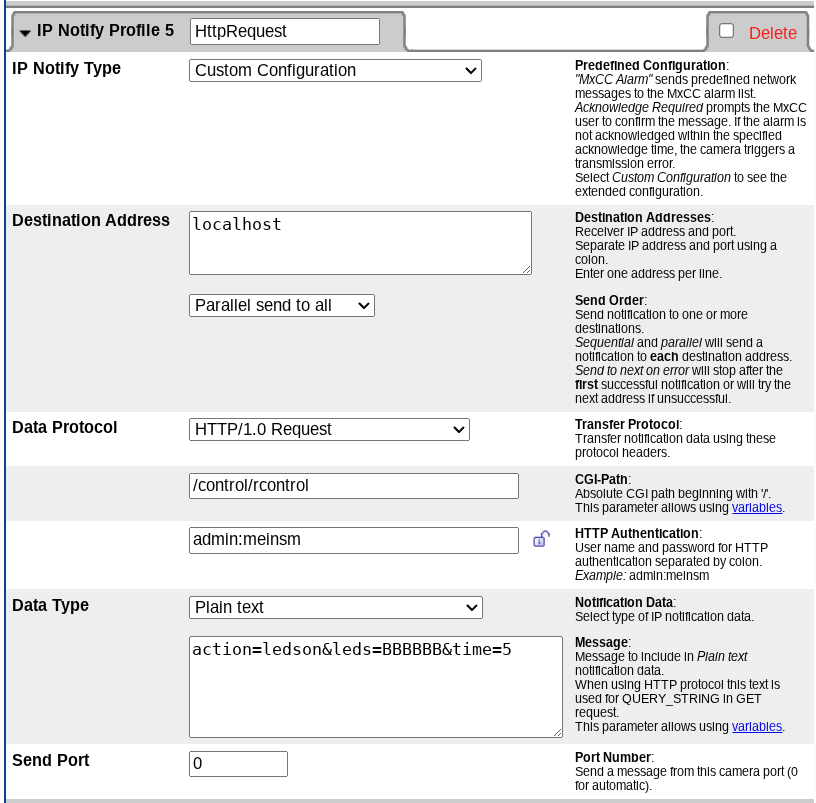
UPDATE2: Found the problem - looks like a programming bug by Mobotix. In the Current Configuration data, the IP streams sent to Localhost 127.0.01 use admin/password to authenticate - and in the Configuration, it has the wrong password, namely an old password I haven’t used in years. I edited the file, and now it works properly.
Not sure why the old password reasserted itself after years of the system working correctly. And a side effect of this bug seems to be lost frames while the unit stalls trying to authenticate with the wrong password.
Great to hear you solved the issue and shared your success with the community! Thanks for reporting back and explaining what you did.
To add some context about the behavior you observed:
MOBOTIX cameras, as a decentralized system, offer countless options for events and communication. With IP-Notify, you can send HTTP commands to any device in the network—or even back to the camera itself—using its API. This allows you to leverage the full spectrum of the Camera API. In your case, it seems you sent a command to store the camera configuration via localhost (127.0.0.1).
A few important points to keep in mind:
Each IP-Notify profile requires its own authentication credentials.
If you previously configured an IP-Notify profile with credentials for remote API access, these credentials are not automatically synchronized when you change the camera’s user credentials in the camera menu.
Performing a factory default reset (All) will reset all settings, including IP-Notify profiles. However, if you only reset the Admin/User credentials, your existing IP-Notify profiles remain unchanged.
Example of the IP Notify Profil to send a command to the camera via localhost:
So, it appears the issue was caused by a mix of partial resets and customized IP-Notify profiles that retained old passwords. This explains why the authentication failed:
The camera user database does not automatically sync with individual IP-Notify authentication settings.
I hope this clarifies the situation. It’s not a camera bug but rather a result of the complexity of the configuration.