

Push Sound – Integration of the MOBOTIX camera and the MOBOTIX LIVE app
This article explains how push notifications work between a MOBOTIX camera and the MOBOTIX LIVE app, and why the notification sound sometimes needs to be adjusted or updated.
Push notifications – a brief explanation
We’re all familiar with push notifications in our daily lives: messaging apps like WhatsApp or Signal, as well as social media apps like Instagram, regularly send push notifications to our smartphones.
MOBOTIX cameras, such as a door station, can also send notifications of events such as doorbells ringing or alarm alerts to a smartphone via push notifications.
Important:
Push notifications are not sent directly from the camera to the smartphone, but always via a so-called push provider on the internet.
The two major push notification services
Smartphones worldwide mainly use two push services:
AppleAPNs
Apple Push Notification Service
Google
Firebase Cloud Messaging (FCM)
The MOBOTIX LIVE app uses Google Firebase Cloud Messaging (FCM) to send push notifications.

How does push notification work?
Before a camera can send push notifications, the smartphone must first obtain an FCM token.
This token is generated automatically as soon as, in the MOBOTIX LIVE app:
-
Alarm notifications can be enabled or
-
Ring events can be enabled.
The process in simple terms:
- The app requests an FCM token from the push service.
- This token is automatically stored in the camera.
- The camera can now send push notifications to the smartphone via the push server.
The token acts as a digital postal address for the smartphone.
Why Push runs via the operating systemPush-Nachrichten werden vom Smartphone-Betriebssystem verwaltet, nicht direkt von der App.
This has two advantages:
- The app does not need to run continuously in the background
- Battery consumption remains low
Change push notification sound
The ringtone for a push notification is controlled via the camera’s push settings.
If you change the ringtone, you will need to briefly disable and then re-enable the ringtone notification in the MOBOTIX LIVE app.

The push profiles on the camera are updated automatically.
Please note regarding renamed profiles
By default, the camera creates push profiles with the following names:
-
iPhone Ring Event
-
iPad Ring Event
These names should not be changed.

If a profile is renamed (e.g. “iPhone Joerg”), this may result in duplicate push profiles during a subsequent update.
The result:
-
two push notifications
-
two ringtones playing at the same time
This might be of interest to DJ enthusiasts – for everyone else, it is advisable to delete the individual profile.
The profiles can be found here:
Admin → Network Profiles

and at:
Admin → Doorbell settings and video mailbox

Testing push notifications
A very useful feature is the “Network Configuration Test”.
This allows you to trigger push notifications manually.
The function also displays a log window that provides detailed information about the connection setup.
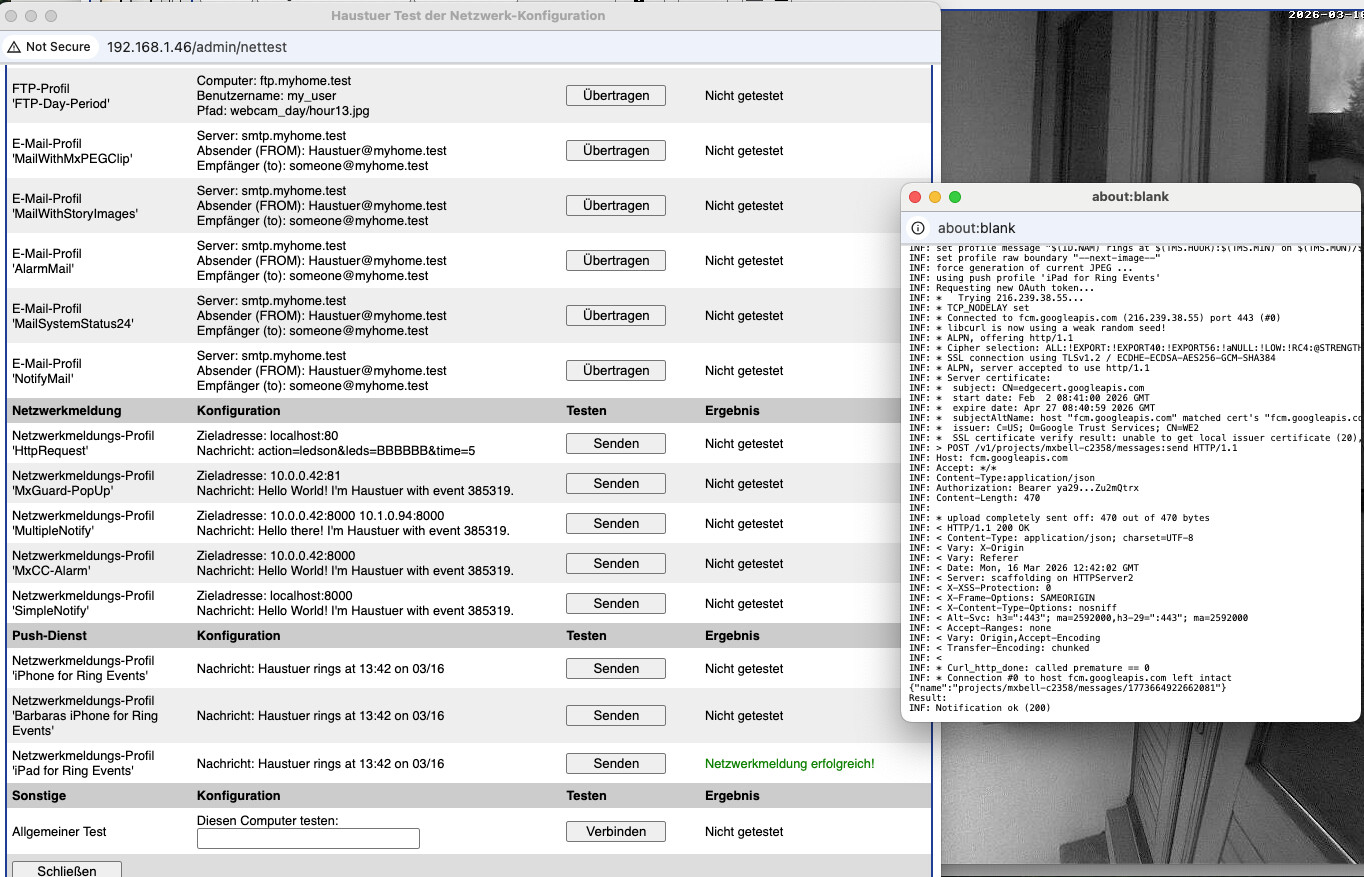
This helps with:
-
troubleshooting
-
identifying end devices
-
checking the push configuration
Change push notifications centrally (for experts only)
Experienced users also have the option to change push notification sounds directly in the camera settings.
This is useful when several devices are linked to a single camera and an administrator wants to adjust the push notification sound centrally without having direct access to the individual smartphones or tablets.
Path:
Admin → Edit camera configuration
Section:
Pushservice.json
In that file, on the line
sound:
The name of the sound file can be changed.
The change takes effect immediately once the configuration is saved.
It is not necessary to restart the camera.

List of available sound files:
- alarm.wav
- classic.wav
- ding_dong.wav
- highpitch.wav
- jingle_bells.wav
- notify.wav
- police.wav
- ring.wav
- siren.wav
- arpeggio.wav
- beep_beep.wav
- chime_high.wav
- chime_low.wav
- emergency.wav
- horn.wav
- modern.wav
- welcome_piano.wav
- xylophone.wav
Important note
You should always create a backup of the camera configuration before making any manual changes.
When making manual changes to the configuration file, the system does not check for input errors!
Or to put it another way:
For experts only – this is open-heart surgery.